Audio Unit plug-in for Logic Pro
Your whole album, at one loudness.
Put Album Leveler on each song, play the album through, and press one button. Every track gets its own gain, so the record plays at an even level from the first song to the last.
- Up to 64 tracks
- One click to level
- Saved with your project
Why
Songs finished months apart rarely match.
Songs recorded, mixed and mastered at different times tend to end up at different loudness. Put them in order and one song jumps out while the next sounds small. Matching them by ear means playing back and forth and nudging faders, then doing it all again after a remaster.
Album Leveler measures each song the way loudness meters do (integrated LUFS, following the ITU-R BS.1770 method). Then it sets every track to a shared target in one step. It only changes level. Your EQ, dynamics and master stay as they are.
What you get
Built for sequencing an album, not one song.
-
Measures while you listen
Analysis runs while Logic is playing. Play each song through and it is measured. No bouncing, no exporting.
-
One click for the whole album
Calculate from any instance and every track gets its own gain towards your target loudness.
-
Album overview
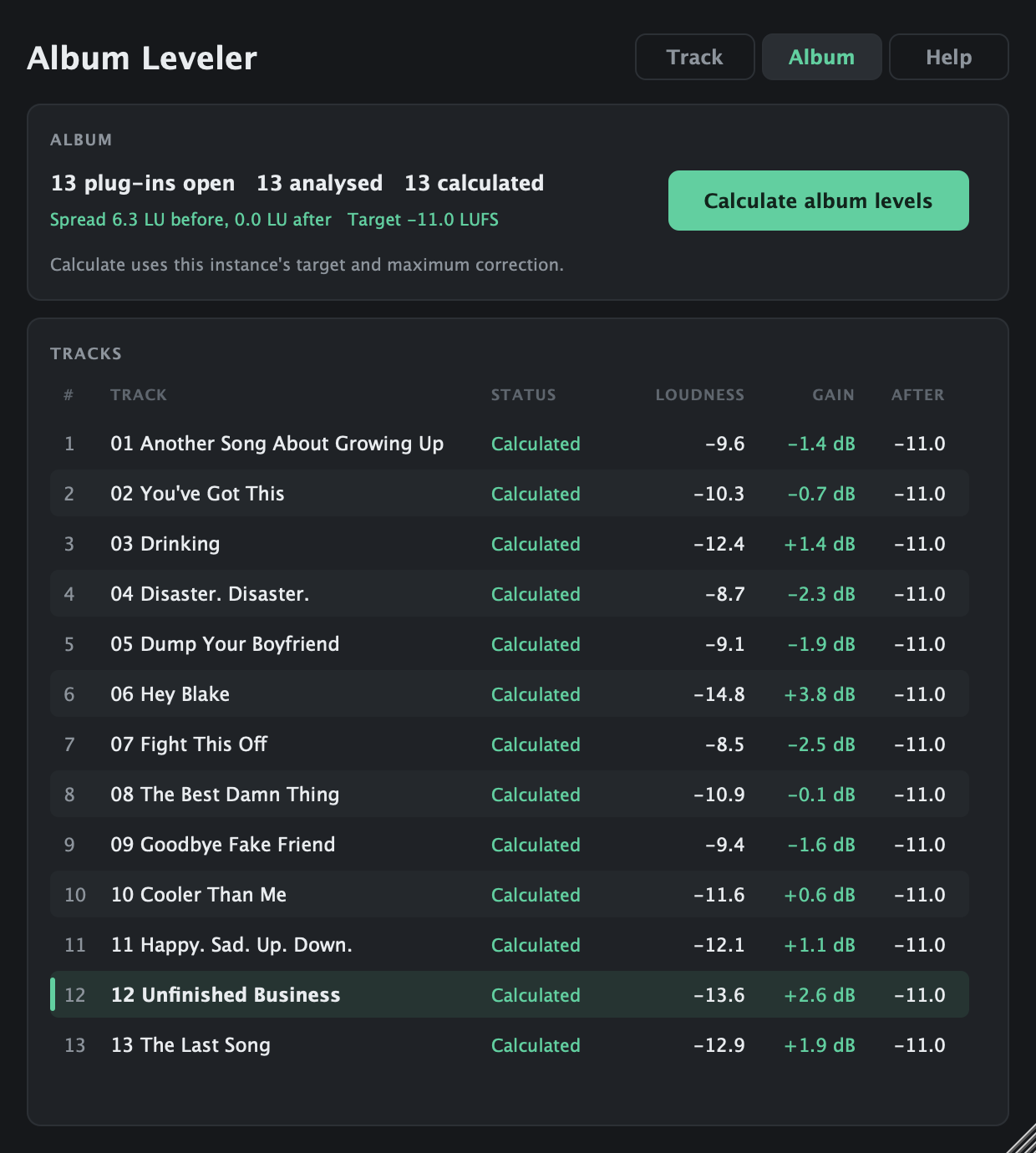
See every song in one table: its loudness, its gain and where it lands afterwards, plus the album's spread before and after.
-
Knows your track names
Each instance picks up its Logic track name automatically. You can type your own if you prefer.
-
You set the limits
Choose a target from -18 to -6 LUFS and cap how far any song can move, so a quiet ballad can stay intimate on purpose.
-
Safe by design
Each track only ever applies its own gain. You get warnings about shared slots, mismatched settings and possible clipping.
-
Saved with the project
Gains, analysis and names are stored in the Logic project and come back when you reopen it.
-
Built-in help
A Help tab inside the plug-in explains every setting and the steps, so you don't need the manual open.
How it works
Five steps, about one album's listening time.
-
Insert it on every song
Add Album Leveler to each song's stereo track, last in the chain. Each instance takes its own track slot automatically.
-
Pick a target
Set the same Target loudness and Maximum correction on every instance. The default is -11 LUFS with a 6 dB limit.
-
Reset, then play
Press Reset all analysis, then play each song from start to finish. The status shows Analysing… while it measures.
-
Calculate
Press Calculate album levels on any instance. Every track's gain is set at once, and the Album tab shows the result.
-
Listen and refine
Play through the album in order. Loudness gets you close; your ears make the final call.
Screenshots
Three tabs, nothing hidden.
Shown levelling Rock and Roll Heart by Backroom Stereo.
Track
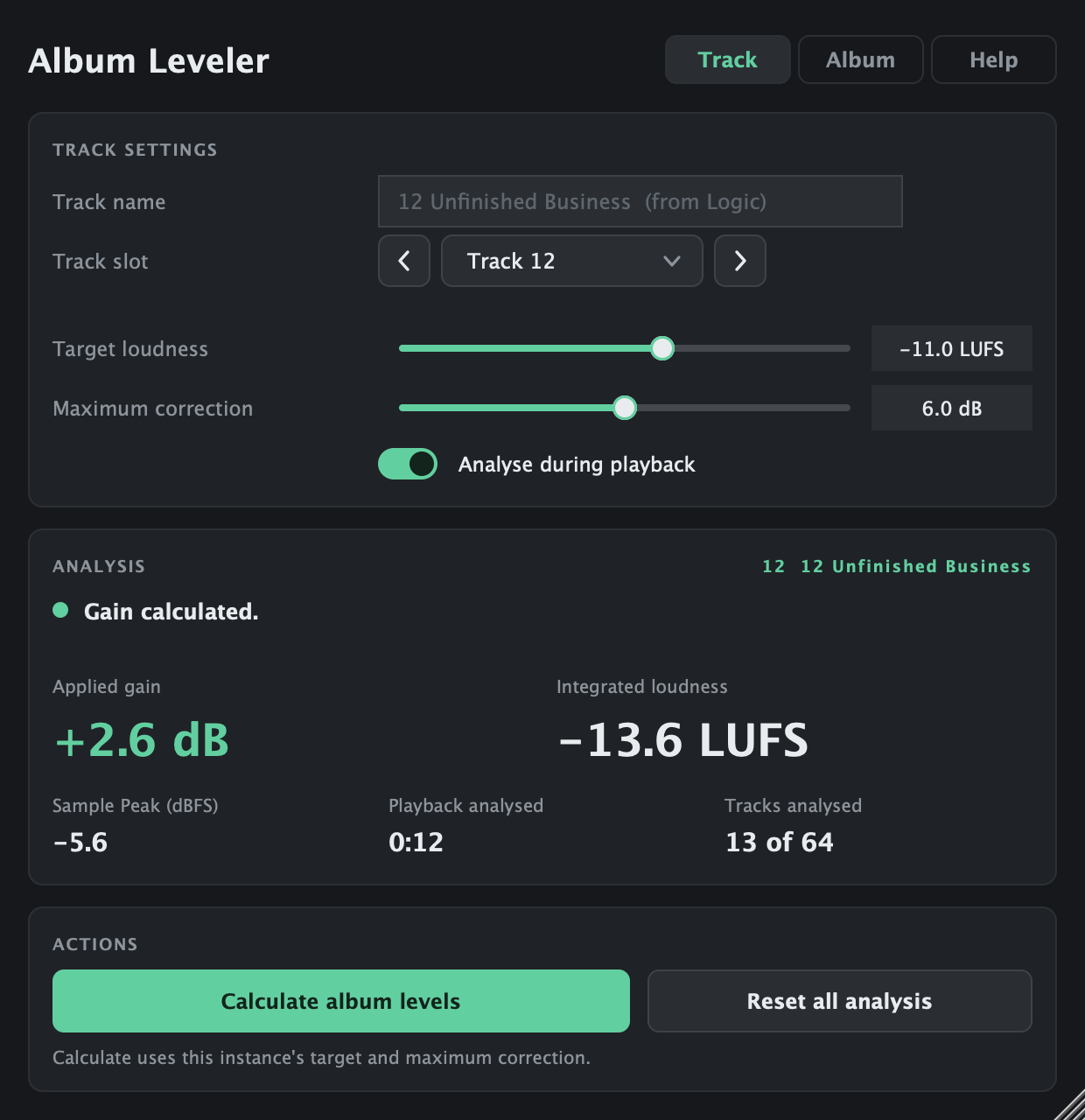
Everything about the song this instance sits on: its name (taken from Logic), its slot, the target and limit, and the measurement: integrated loudness, sample peak, how much was played and the gain being applied.
Album
Every Album Leveler in the project in one table. See which songs are analysed, the gain each one gets, where it lands afterwards and how far apart the album is before and after. Calculate from here too.
Help
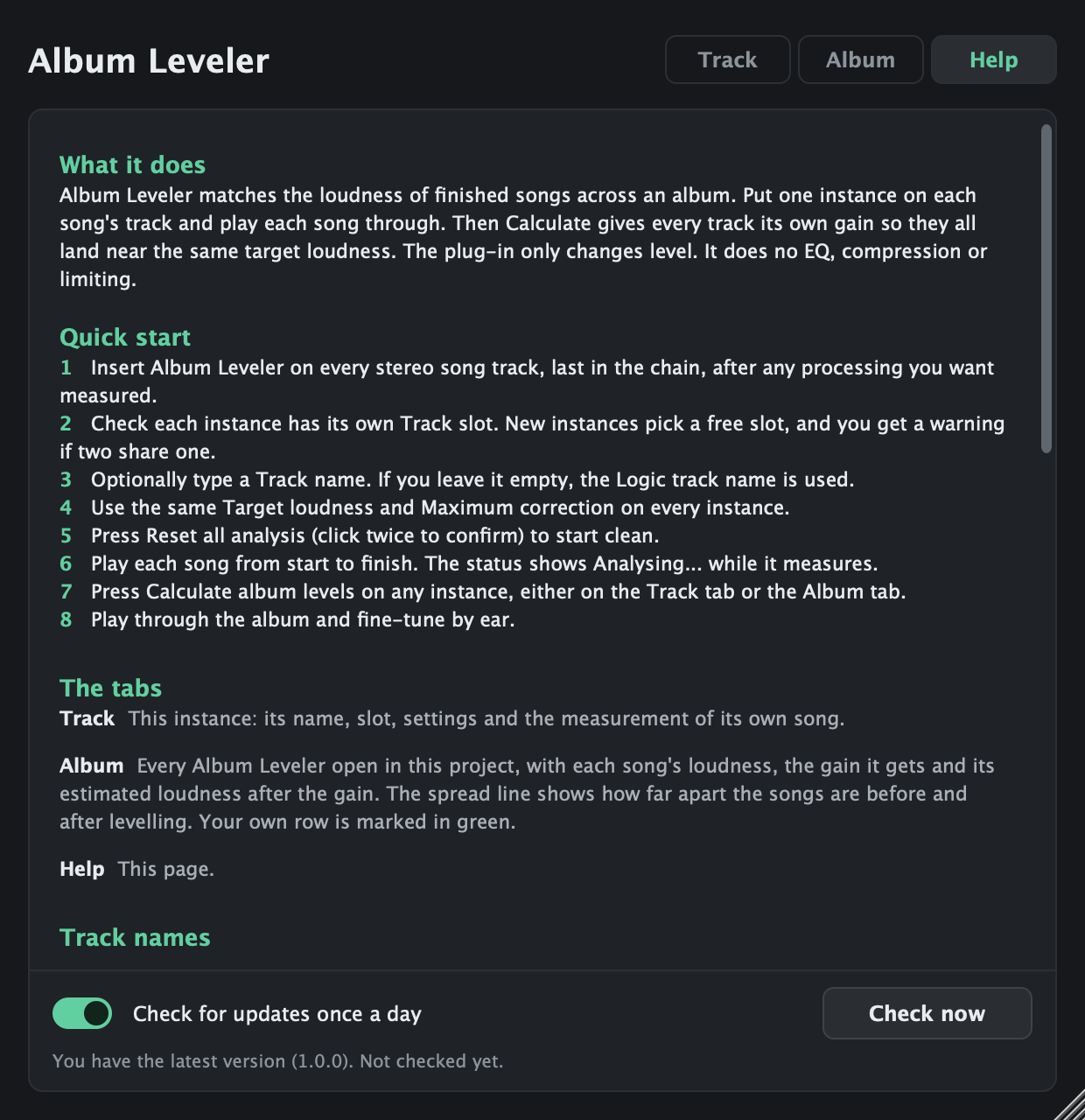
The quick start, what every setting does and the things worth knowing, inside the plug-in.
Compatibility
Made for Logic Pro on the Mac.
| Host | Format | Status |
|---|---|---|
| Logic Pro (including Logic Pro X versions that run on macOS 11+) | Audio Unit | Tested |
| GarageBand | Audio Unit | Expected to work, not tested |
| Other Mac hosts (e.g. Ableton Live, Reaper, Cubase) | AU / VST3 | Expected to work, not tested |
| Windows | – | Not available |
- macOS
- 11 Big Sur or later
- Mac
- Apple Silicon (M1 and later)
- Channels
- Stereo or mono tracks
- Tracks
- Up to 64 per project
All instances need to run inside the same host process to share their measurements. In Logic, that is the normal setup on Apple Silicon. If Logic runs under Rosetta, or hosts plug-ins out of process, the instances can't see each other.
Get it
Album Leveler 1.0
Audio Unit and VST3 for macOS, with free updates for every 1.x version.
Coming soon
Signed and notarised installer for macOS. Secure checkout by Gumroad: card, PayPal or Apple Pay.
Not yet availableAlready bought it? Get the latest version
- Open your Gumroad receipt email and click View content, or sign in at gumroad.com/library with the email you used to buy.
- Download the installer. It's always the newest version.
- Quit Logic, run the installer, then reopen Logic. Your projects and settings stay as they are.
If Logic still shows the old version, open Logic Pro → Settings → Plug-in Manager, select Album Leveler and choose Reset & Rescan Selection.
What's new
- 1.0.0
- First release.
FAQ
Questions
Does it change the sound of my songs?
No. It only applies a clean gain change per track. There's no EQ, compression or limiting.
Is it a limiter? Can it clip?
It isn't a limiter. If a song gets a positive gain that could push its sample peak above 0 dBFS, the plug-in warns you ("May clip"). Peaks are sample peaks, not true peaks, so check your final master with a true-peak meter.
Do I have to play every song all the way through?
For the most accurate result, yes. Integrated loudness describes a whole song. Playing part of a song still gives a reading, but it only represents the part you played.
What happens when I play a song again after calculating?
Loudness is measured before the plug-in's own gain, so the correction isn't measured twice. If new analysis arrives after a calculation, the plug-in tells you, and you can press Calculate again.
Is it a certified loudness meter?
No. It follows the ITU-R BS.1770 method (K-weighting, gating, channel summing) and measures standard test signals within 0.02 LU, but it hasn't been through formal EBU conformance testing. It's built for matching songs to each other, not for delivery compliance.
Why does a mono track read 3 dB quieter?
That's how the loudness standard works: a mono track measures 3 dB lower than the same audio on both channels of a stereo track. Use stereo tracks so every song is measured the same way.
How do updates work?
Once a day the plug-in checks a small version file on this website. Nothing about you or your project is sent. If a newer version is out, a button appears at the top of the plug-in that opens this page. Nothing is installed automatically. You can switch the check off on the Help tab.
Are my settings saved?
Yes. Each instance stores its slot, settings, name, analysis and gain in the Logic project.